
Customer support plays an important role in the success of any business. Customers expect quick answers, helpful information, and an easy way to resolve their problems. However, answering repetitive questions throughout the day can consume valuable time and prevent employees from focusing on more complicated tasks.
An AI customer support chatbot can help businesses manage common questions, guide visitors through available services, and collect information before transferring a request to a human representative.
With the help of AI models and workflow automation tools, businesses can build chatbots that understand natural language and respond using approved business information.
In this guide, you will learn what an AI customer support chatbot is, how it works, which tools you can use, and how to build a practical chatbot workflow for your business or AI automation agency.
🤖 What Is an AI Customer Support Chatbot?
An AI customer support chatbot is a software assistant that uses artificial intelligence to understand customer questions and generate relevant responses.
Unlike a basic rule-based chatbot, which follows predefined menus and instructions, an AI chatbot can interpret different ways of asking a question and respond using the information available to it.
For example, a customer might ask:
- 💬 “What services do you offer?”
- 💬 “How much does your automation service cost?”
- 💬 “Can I schedule a consultation?”
- 💬 “How can I contact your support team?”
An AI chatbot can interpret these questions and provide appropriate answers when the necessary information is available.
A chatbot can also connect to other business systems to retrieve information, create support tickets, or collect appointment requests. These actions require the appropriate integrations and permissions.
Traditional Chatbots vs. AI Chatbots
| Traditional chatbot | AI customer support chatbot |
|---|---|
| Uses predefined rules and menus | Can interpret natural-language questions |
| Usually expects specific choices | Can handle different phrasings of a question |
| Works well for fixed workflows | Can respond to a wider range of inquiries |
| Requires predefined responses | Can generate responses from approved information |
| May struggle with unexpected questions | Can recognize some unfamiliar requests, but may still make mistakes |
Both types can be useful. A traditional chatbot may be sufficient for a simple menu, while an AI chatbot can be more appropriate when customers ask questions in their own words.
🚀 Why Businesses Need AI Customer Support Chatbots
Customer support teams often handle the same questions repeatedly. A chatbot can help manage these requests while allowing employees to concentrate on issues that need personal attention.
1. ⏱️ Faster Responses
Customers can receive answers to common questions without waiting for an employee to become available.
A chatbot can provide information about:
- Business hours.
- Available services.
- Pricing information.
- Frequently asked questions.
- Contact details.
- Basic booking procedures.
The quality of the response depends on the accuracy of the information provided to the chatbot.
2. 🌙 Support Outside Business Hours
A website chatbot can respond to supported questions even when a business’s staff are offline.
For example, a potential customer visiting a website late at night could learn about available services and submit their contact details for a follow-up.
However, a chatbot should not promise that a human representative is available around the clock unless the business actually provides that service.
3. 💰 Reduced Repetitive Work
Employees often spend time answering questions that have already been addressed in FAQs or service documentation.
Automating suitable requests can reduce repetitive work and allow support teams to focus on complicated problems.
4. 📈 Better Lead Collection
A chatbot can ask relevant questions when a visitor expresses interest in a service.
For example, an automation agency could ask a visitor about their business type, main challenge, and preferred consultation time.
With the visitor’s permission, the workflow can store the information in a CRM and notify the sales team.
5. 📊 More Organized Customer Inquiries
A chatbot can classify requests into categories such as sales, billing, technical support, or general information.
This information can be passed to the appropriate team or used to create a support ticket.
The result is a more organized process for managing customer requests.
⚙️ How Does an AI Customer Support Chatbot Work?
An AI chatbot combines a user interface, an AI model, business information, and sometimes a workflow automation platform.
Here is a typical process.
Step 1: A Customer Sends a Message
The customer opens the chat widget on a website and asks a question.
For example:
“Can you help me automate customer inquiries for my business?”
Step 2: The System Processes the Question
The chatbot receives the message and sends it to the relevant AI system.
Depending on the implementation, the system may also identify the customer’s intent, retrieve previous conversation context, or check whether the question requires a specific workflow.
Step 3: The Chatbot Retrieves Relevant Information
The chatbot may search a collection of approved business documents, FAQs, service descriptions, or other information sources.
This approach helps the chatbot answer questions using the business’s actual information rather than relying entirely on general knowledge.
Step 4: The AI Generates a Response
The AI model uses the available information to prepare an answer.
For example, if a visitor asks about chatbot development, the assistant can explain the services listed in the company’s approved documentation.
If the information is missing or uncertain, the chatbot should acknowledge the limitation and offer another way to get help.
Step 5: An Automation Workflow Performs an Action
When necessary, the chatbot can connect to a workflow that performs an approved action.
Examples include:
- 📋 Creating a support ticket.
- 📩 Sending a notification to the support team.
- 📊 Adding an inquiry to a CRM.
- 📅 Initiating an appointment request.
- ✉️ Preparing a follow-up email.
These actions should be configured with appropriate validation and permissions.
Step 6: The Chatbot Escalates Complicated Requests
Not every question should be handled automatically.
If a customer has a billing dispute, an account-security concern, or a complicated technical problem, the chatbot should direct the request to a human representative.
A reliable chatbot is designed to recognize its limits rather than trying to answer every question.
🧰 Tools You Can Use to Build an AI Customer Support Chatbot
You do not necessarily need to develop an entire chatbot from scratch. Several tools can help you create the different parts of the system.
1. n8n — Workflow Automation
n8n can connect AI models, business applications, APIs, and databases in a single workflow.
Useful for:
- Processing incoming customer messages.
- Connecting a chatbot to a CRM.
- Routing support requests.
- Creating notifications and tickets.
- Building customized AI workflows.
n8n is particularly useful when you want greater control over the automation logic.
2. Make — Visual Workflow Automation
Make provides a visual environment for connecting applications and designing multi-step workflows.
Useful for:
- Sending customer information to other applications.
- Routing inquiries to different teams.
- Connecting forms, email, and CRM tools.
- Creating conditional support workflows.
Its visual structure can help beginners understand how data moves between different steps.
3. Zapier — Application Integrations
Zapier connects supported applications through triggers and actions.
Useful for:
- Sending support notifications.
- Recording customer inquiries.
- Connecting forms to business applications.
- Automating routine administrative tasks.
Its suitability depends on the complexity, integrations, and usage requirements of your chatbot workflow.
4. AI Models and APIs
An AI model provides the language-understanding and response-generation capabilities of the chatbot.
An API allows your chatbot or workflow platform to communicate with the model.
When choosing a provider, review its current pricing, privacy terms, model capabilities, and integration requirements.
5. Website Chat Interface
Customers need a way to communicate with the chatbot.
This may be a chat widget embedded on your website or an interface provided by a chatbot platform.
The interface should make it easy to send messages, understand the response, and request human assistance.
Important: These components serve different purposes. An AI model generates responses, an automation platform connects systems, and the chat interface allows customers to interact with the assistant.
🛠️ How to Build an AI Customer Support Chatbot Step by Step
The following example uses a website chatbot connected to an AI model and an automation workflow.
The exact implementation will depend on the tools you select.
Step 1: 🎯 Define the Chatbot’s Purpose
Before choosing tools, decide what the chatbot should accomplish.
A good first project should have a limited and clearly defined scope.
For example, your chatbot might:
- Answer common questions about services.
- Explain business hours and contact options.
- Collect details from potential customers.
- Direct complicated inquiries to a human.
- Create a support ticket when needed.
Avoid trying to automate every customer interaction in the first version.
Step 2: 📚 Prepare Your Business Information
The chatbot needs accurate information to answer customer questions.
Create a document containing your approved business information.
Include:
- Company introduction.
- Service descriptions.
- Pricing information, if available.
- Frequently asked questions.
- Business hours.
- Contact information.
- Support and escalation procedures.
Keep this information updated whenever your services or policies change.
If you are building a chatbot for a client, obtain approval before using their business documents.
Step 3: 🧠 Choose an AI Model
Select an AI model that meets your requirements for response quality, speed, cost, and privacy.
Your chatbot should receive clear instructions about how it is allowed to answer questions.
For example, its instructions could require it to:
- Answer using approved business information.
- Avoid inventing prices or policies.
- Ask a clarifying question when necessary.
- Keep responses concise and helpful.
- Refer uncertain requests to a human.
- Avoid exposing confidential information.
These instructions improve consistency but do not guarantee that the model will always behave correctly. Testing and safeguards are still necessary.
Step 4: 🔗 Connect the AI Model to an Automation Platform
Use a supported integration or API connection to pass customer messages to the AI model.
A typical workflow might contain the following components:
- Incoming message: Receive the customer’s question.
- Input validation: Check that the message contains usable information.
- Knowledge retrieval: Find relevant business information.
- AI processing: Generate an appropriate response.
- Response checks: Apply required validation or escalation rules.
- Chat reply: Return the response to the website interface.
Additional steps may be required for authentication, conversation history, rate limits, and error handling.
Step 5: 🌐 Connect the Chatbot to Your Website
Add the chatbot interface to your website using a supported widget, plugin, or custom integration.
The interface should be easy to find without blocking important page content.
Consider including:
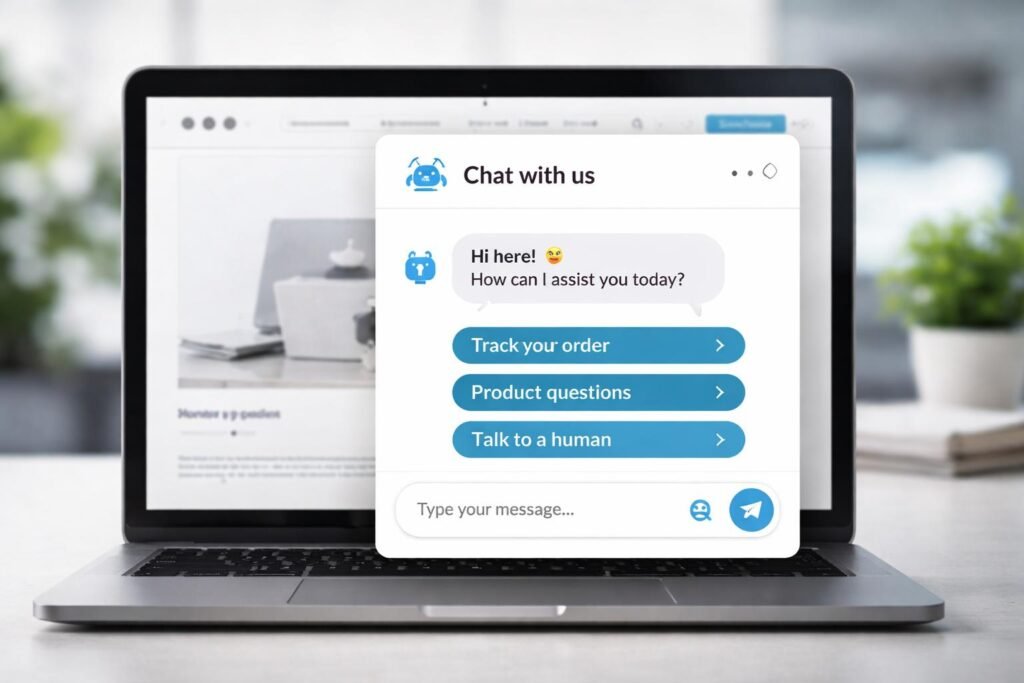
- A clear welcome message.
- A simple message input.
- Suggested questions.
- A visible human-support option.
- A notice explaining that the visitor is interacting with AI.
Test the interface on mobile devices as well as desktop screens.
Step 6: 📋 Add CRM and Support Integrations
If the chatbot needs to collect leads or manage support requests, connect it to the relevant business applications.
For example, a lead-collection workflow could record:
- Customer name.
- Contact information.
- Business type.
- Requested service.
- Summary of the inquiry.
- Follow-up status.
Collect only the information needed for the stated purpose, and follow applicable privacy and consent requirements.
Step 7: 🧪 Test the Chatbot Before Launch
Testing is essential because a chatbot can produce incorrect answers even when its basic workflow is functioning.
Test questions such as:
- What services do you offer?
- How much does your service cost?
- Can I speak to a human?
- What happens if my request is urgent?
- What if I ask something unrelated?
- What if your website information does not answer my question?
Also test empty messages, unusual inputs, integration failures, and repeated submissions.
Check whether the chatbot provides accurate answers, protects private information, and escalates requests appropriately.
Step 8: 🚀 Launch and Monitor Performance
Start with a limited deployment and review real interactions.
Track useful measurements such as:
- Number of conversations.
- Percentage of questions resolved.
- Human escalation rate.
- Response time.
- Customer feedback.
- AI and automation costs.
- Incorrect or incomplete responses.
Use these results to improve the chatbot’s instructions, knowledge sources, and workflow logic.
💬 Example: An AI Chatbot for an Automation Agency
Imagine that LogicAutomates.com offers AI chatbots and business workflow automation services.
A visitor arrives on the website and opens the chatbot.
Customer: “I want to automate customer support for my online store. Can you help?”
AI chatbot: “We can help you explore customer support automation, including FAQ assistants and workflows that connect customer inquiries with your business tools. Could you tell me which platform your store uses?”
Customer: “I use Shopify.”
AI chatbot: “Thank you. A possible solution could connect customer inquiries with your order information and support workflow. The exact setup would depend on your requirements. Would you like to request a consultation?”
If the customer agrees, the workflow can collect the necessary contact details, record the inquiry, and notify the agency’s team.
This example demonstrates how a chatbot can combine conversation with a practical business workflow.
The chatbot should not claim that an integration is available or promise a particular result until the agency has confirmed that it can deliver the requested solution.
📈 Best Practices for Building a Reliable AI Chatbot
A chatbot should be designed around customer needs, business rules, and realistic expectations.
1. Keep the Knowledge Base Accurate
Outdated information can lead to incorrect answers.
Review your FAQs, service descriptions, and policies regularly. Remove information that is no longer valid.
2. Give the Chatbot a Clear Scope
Specify which questions it can answer and which requests require human support.
A limited chatbot with reliable answers is more useful than one that attempts to handle every possible topic.
3. Protect Customer Information
Use appropriate authentication, access controls, and data-retention policies.
Avoid sending sensitive information to external services unless the tools and configuration are suitable for that information.
4. Make Human Support Easy to Access
Customers should be able to request human assistance without navigating an endless automated conversation.
Provide a clear escalation process and explain when a representative will respond.
5. Monitor AI Quality and Costs
Review conversations for incorrect answers, unnecessary AI calls, and repeated failures.
Set appropriate usage limits and alerts to help manage costs.
6. Improve the Chatbot Based on Feedback
Use customer feedback and conversation patterns to identify missing FAQs and confusing responses.
Make changes carefully and test them before deploying updates.
💰 How Can an AI Automation Agency Sell Chatbot Services?
AI chatbots can become one of the services offered by an automation agency.
Instead of selling only a chatbot interface, focus on the business problem you can solve.
Possible Service Packages
🟢 Basic FAQ Chatbot
- Answers approved frequently asked questions.
- Explains basic services and contact options.
- Provides a route to human support.
🔵 Customer Support Automation
- Connects the chatbot to selected business tools.
- Categorizes incoming inquiries.
- Creates support tickets or notifications.
- Includes basic monitoring and testing.
🟣 Advanced Support Workflow
- Integrates with approved knowledge sources.
- Connects to CRM or order-management systems.
- Routes different types of requests.
- Includes more extensive testing, permissions, and error handling.
Pricing should reflect the actual scope, complexity, integrations, AI usage, maintenance, and support requirements. Avoid promising results that have not been demonstrated.
For an early project, build a working demo with sample business information. This allows potential clients to understand the service before committing to a full implementation.
⚠️ Common Mistakes to Avoid
- ❌ Launching without testing: Incorrect answers can damage customer trust.
- ❌ Using outdated information: The chatbot may communicate old prices or policies.
- ❌ Removing human support: Some questions need personal attention.
- ❌ Giving excessive permissions: Limit integrations to the actions the chatbot actually needs.
- ❌ Ignoring ongoing costs: AI usage, hosting, and maintenance can add up.
- ❌ Promising complete automation: Some conversations will always need human judgment.
❓ Frequently Asked Questions
1. Can I build an AI customer support chatbot without coding?
Yes. Some chatbot builders and visual automation platforms support no-code or low-code implementations. Advanced integrations may still require API knowledge or custom code.
2. Which tool is best for building an AI chatbot?
The best tool depends on your requirements. n8n is worth exploring for customized workflows, Make offers visual automation, and Zapier is useful for many straightforward integrations. Dedicated chatbot platforms may also suit particular projects.
3. Can an AI chatbot work 24/7?
A properly hosted chatbot can accept and respond to supported questions at any time, subject to service availability, configured limits, and integration reliability. Human assistance may have separate operating hours.
4. Can an AI chatbot connect to a CRM?
Yes, if the chatbot platform or workflow supports the required CRM integration or API. Appropriate permissions and data validation should be configured.
5. How much does it cost to build an AI chatbot?
Costs depend on the chatbot platform, AI model, number of conversations, integrations, hosting, setup, and maintenance. Start by defining the requirements and estimating ongoing usage before selecting a solution.
6. Can an AI chatbot replace a human support team?
It can handle some repetitive questions, but complex complaints, sensitive issues, and unusual situations may require human judgment. Most businesses should provide an effective escalation process.
7. How do I prevent a chatbot from making up answers?
Use approved information sources, clear instructions, appropriate retrieval methods, validation rules, and human escalation. These measures reduce the risk but cannot guarantee that every answer will be correct.
8. Can I sell AI chatbots to small businesses?
Yes. Small businesses may benefit from automated FAQs, lead collection, and support workflows. Demonstrate a practical solution and explain its limitations, operating costs, and maintenance needs.
🎯 Conclusion
An AI customer support chatbot can help businesses answer common questions, organize inquiries, and reduce repetitive customer service work.
Building a reliable chatbot involves more than connecting an AI model to a website. You also need accurate business information, suitable integrations, clear instructions, privacy safeguards, testing, and human escalation.
Start with a focused use case, such as answering FAQs or collecting leads. Test it thoroughly, monitor its performance, and expand its capabilities as your requirements grow.
For LogicAutomates.com, AI customer support chatbots can become a practical service offering that helps businesses connect AI capabilities with real operational needs.