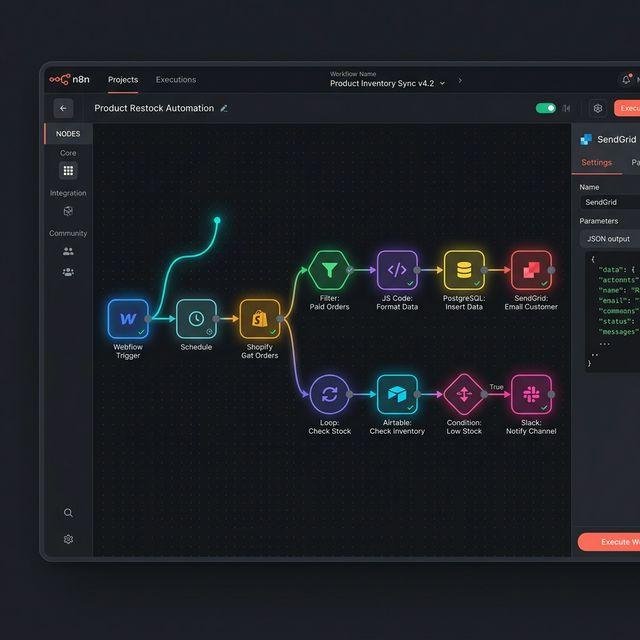
AI automation is helping businesses simplify repetitive tasks, connect applications, and improve productivity. From managing customer inquiries to organizing sales leads, modern automation tools allow businesses to build workflows without manually handling every step.
However, choosing the right automation platform can be challenging. Some tools are designed for beginners who want simple integrations, while others provide greater flexibility for developers and businesses building advanced AI workflows.
Three platforms worth exploring are n8n, Make, and Zapier. Each offers a different approach to workflow automation, integrations, and AI-powered processes.
In this guide, we compare their features, advantages, limitations, use cases, and suitability for different business needs. You will also learn how to choose the right tool for your AI automation agency.
🤖 What Are AI Automation Tools?
AI automation tools help businesses connect software applications, process information, and execute tasks through automated workflows.
These platforms can combine traditional automation with AI models that classify messages, summarize documents, extract information, or generate content.
For example, a business might create a workflow that:
- 📥 Receives a customer inquiry through a website form.
- 🧠 Uses AI to classify the inquiry.
- 📊 Stores the customer’s details in a CRM.
- ✉️ Prepares a relevant follow-up message.
- 🔔 Notifies the appropriate team member.
Without automation, an employee might need to perform each step manually. With a properly configured workflow, much of the process can happen automatically.
AI automation platforms are useful for:
- Customer support and chatbot workflows.
- Lead generation and CRM management.
- Email and marketing automation.
- Appointment scheduling.
- Document processing.
- Business reporting.
- E-commerce operations.
- Connecting AI models to business applications.
The right platform depends on your technical skills, budget, workflow complexity, and the applications you need to connect.
⚙️ 1. What Is n8n?
n8n is a workflow automation platform that allows users to connect applications, APIs, databases, and AI services through visual workflows.
It is particularly interesting for users who want flexibility and more control over how their automations operate.
Users build workflows by connecting nodes. Each node performs a task, such as receiving information, transforming data, calling an API, or sending a notification.
⭐ Key Features of n8n
- 🔗 Visual workflow builder: Connect multiple steps into a single workflow.
- 🧠 AI integrations: Build workflows that use AI models for tasks such as classification and summarization.
- 🔌 API connectivity: Connect services through HTTP requests and APIs.
- 🧩 Conditional logic: Route information according to rules and workflow conditions.
- 💻 Custom code: Use code when built-in nodes are insufficient.
- 🏠 Self-hosting options: Run n8n on infrastructure you manage, subject to its licensing and deployment terms.
- 🔄 Workflow control: Design multi-step processes with error handling and branching.
Feature availability and implementation details can depend on the deployment method, version, and plan.
✅ Advantages of n8n
1. Greater workflow flexibility
n8n is useful when an automation needs several conditions, API calls, data transformations, or custom processing steps.
2. Suitable for advanced AI workflows
You can connect AI models with databases, business applications, and external services to build more sophisticated processes.
3. Self-hosting flexibility
Self-hosting can provide more control over infrastructure and data handling, although it also introduces responsibility for security, updates, backups, and maintenance.
4. Useful for automation agencies
Agencies can use n8n to create tailored workflows for different clients, particularly when projects require custom integrations.
⚠️ Limitations of n8n
- The learning curve can be steeper for complete beginners.
- Complex workflows require testing and troubleshooting.
- Self-hosting requires technical knowledge and ongoing maintenance.
- Some integrations may require API configuration or custom code.
- AI features do not automatically guarantee accurate results.
💼 Best Use Cases for n8n
n8n is worth considering for:
- AI-powered lead qualification.
- Multi-step CRM workflows.
- Custom chatbot integrations.
- Document processing pipelines.
- Automated business reporting.
- Workflows involving several APIs.
- Projects that require greater infrastructure control.
Example: An automation agency builds a system that receives leads from a website, classifies their requirements with AI, creates CRM records, and alerts the sales team.
n8n is a strong candidate when flexibility and customization are more important than having the simplest possible setup.
🔄 2. What Is Make?
Make is a visual automation platform that allows users to connect applications and design workflows through a graphical interface.
Its scenario builder lets users connect modules, map information between steps, add filters, and create branching paths.
This visual approach makes it useful for people who want to understand how information moves through an automation.
⭐ Key Features of Make
- 🎨 Visual scenario builder: Design workflows by connecting modules.
- 🔗 Application integrations: Connect supported business tools and services.
- 🔀 Routers and filters: Direct information through different paths.
- 📊 Data transformation: Format and organize information between steps.
- 🌐 API connectivity: Integrate services when supported modules are unavailable.
- 🧠 AI-powered workflows: Connect AI services to appropriate automation scenarios.
- 🧪 Workflow testing: Run scenarios and inspect how information moves through them.
Specific integrations and capabilities vary by application and subscription plan.
✅ Advantages of Make
1. Visual workflow design
The graphical interface makes it easier to follow the structure of a workflow and understand how each step connects to another.
2. Flexible branching
A scenario can follow different paths depending on the information received.
For example, a customer support workflow can send billing questions to one team and technical questions to another.
3. Useful for business processes
Make can connect marketing tools, CRMs, spreadsheets, forms, and other business applications.
4. Suitable for multi-step automations
You can create scenarios involving multiple applications and data-processing steps without writing all the integration code yourself.
⚠️ Limitations of Make
- Complex scenarios can become difficult to maintain if they are poorly organized.
- Users need to understand data mapping and workflow logic.
- API integrations may require additional configuration.
- Usage limits and plan restrictions must be considered.
- Advanced workflows can still require technical troubleshooting.
💼 Best Use Cases for Make
Make is worth exploring for:
- Marketing campaign workflows.
- CRM updates and lead routing.
- E-commerce notifications.
- Form-to-spreadsheet automation.
- Appointment management.
- Multi-application business processes.
- Visual workflows with multiple conditions.
Example: A marketing agency collects website leads, checks their service requirements, adds them to a CRM, and sends an internal notification to the relevant salesperson.
Make is a practical option for users who prefer visual workflow design and need more flexibility than a simple trigger-and-action setup.
⚡ 3. What Is Zapier?
Zapier is an automation platform that connects applications through triggers and actions. It is widely associated with straightforward business integrations and workflows that can be configured with relatively little technical setup.
A basic Zap begins when a trigger occurs and then performs one or more configured actions.
For example, a new form submission can automatically create a CRM record and send a notification.
⭐ Key Features of Zapier
- 🚀 Trigger-and-action workflows: Start an automation when a defined event occurs.
- 🔗 Application integrations: Connect supported applications without building every integration from scratch.
- 🧠 AI-related capabilities: Use available AI features and connected services where supported.
- 📋 Multi-step workflows: Perform several actions after a trigger.
- 🔀 Conditional paths: Route tasks according to supported rules and features.
- 🛠️ Business integrations: Connect tools used for sales, marketing, support, and administration.
Available functionality depends on the product, integration, and subscription plan.
✅ Advantages of Zapier
1. Beginner-friendly approach
Its trigger-and-action model is straightforward for many common workflows.
2. Useful for routine integrations
Zapier can connect applications without requiring users to build every integration manually.
3. Quick setup for simple tasks
Common workflows, such as sending notifications or copying form responses into another application, can often be configured with limited technical work.
4. Suitable for everyday business automation
Teams can use it to reduce repetitive administrative tasks and connect commonly used business tools.
⚠️ Limitations of Zapier
- Complex custom workflows may require more planning and configuration.
- Usage limits and subscription costs can become important as automation volume grows.
- Advanced integrations may require API knowledge.
- Not every application or feature is available on every plan.
- AI-generated outputs still need suitable validation and safeguards.
💼 Best Use Cases for Zapier
Zapier is worth considering for:
- Form submission notifications.
- Simple CRM updates.
- Email and calendar integrations.
- Basic lead management.
- Routine administrative tasks.
- Connecting common business applications.
Example: Every time someone completes a contact form, Zapier adds the contact to a spreadsheet and notifies the sales team.
Zapier is particularly useful when the goal is to connect applications quickly and the workflow does not require extensive customization.
📊 n8n vs Make vs Zapier: Comparison Table
The three platforms overlap in many areas, but their strengths and trade-offs differ.
| Feature | n8n | Make | Zapier |
|---|---|---|---|
| Workflow design | Node-based visual editor | Visual scenario builder | Trigger-and-action workflows |
| Beginner friendliness | Moderate learning curve | Moderate learning curve | Often easier for simple workflows |
| Customization | High flexibility | Flexible visual logic | Strong for supported integrations |
| AI workflows | Supports custom AI integrations | Supports AI-connected scenarios | Supports AI-related workflows and integrations |
| API integration | Strong customization options | API connectivity available | Supported integrations and API options |
| Self-hosting | Available | Generally cloud-based offering | Generally cloud-based offering |
| Technical skills | Helpful for advanced projects | Helpful for complex scenarios | Often less necessary for basic tasks |
| Best fit | Custom and advanced workflows | Visual multi-step automation | Straightforward application integrations |
This table is a general comparison rather than a guarantee that every feature is available in every plan.
🏆 Which Platform Offers the Most Flexibility?
n8n is a strong candidate when you need custom logic, API connections, and greater control over how workflows operate.
Make is attractive when you prefer a visual scenario builder with flexible branching and data mapping.
Zapier is often convenient when you want to connect common applications and automate straightforward tasks quickly.
The most flexible platform is not automatically the best choice. A simpler tool can be more appropriate when it meets the requirements with less setup and maintenance.
💰 Which AI Automation Tool Is Cheapest?
Pricing changes over time, and the cost of an automation depends on how you use the platform.
Rather than choosing based only on the advertised starting price, compare the total cost of running your intended workflows.
Factors That Affect Automation Costs
- 💳 Subscription fees: The cost of your selected plan.
- 🔄 Usage limits: Tasks, executions, operations, or other metered activity.
- 🧠 AI usage: Charges associated with AI models or external services.
- ☁️ Hosting: Infrastructure costs for self-hosted deployments.
- 🛠️ Maintenance: Time spent monitoring and fixing workflows.
- 📈 Scaling: Additional usage or capacity as the business grows.
How to Compare Costs Properly
Before selecting a platform:
- Estimate how many workflow runs you expect each month.
- Identify how many steps each run requires.
- Check the platform’s current billing model and usage limits.
- Estimate AI model usage separately where applicable.
- Include hosting and maintenance costs if self-hosting.
- Test a realistic workflow before committing to a paid plan.
A platform that looks inexpensive at first may become less economical at higher volumes. Conversely, a more technical solution may provide value if its flexibility reduces other operating costs.
Always check the providers’ official pricing pages for current prices and plan conditions.
🎯 Which Tool Is Best for an AI Automation Agency?
If you want to build an AI automation agency, the best platform depends on the services you plan to sell and the kinds of clients you want to serve.
Choose n8n If You Want to:
- Build customized AI-powered workflows.
- Connect several APIs and business applications.
- Develop complex lead-management systems.
- Explore self-hosted automation.
- Offer technically advanced integrations.
Choose Make If You Want to:
- Build visual, multi-step workflows.
- Connect marketing and CRM applications.
- Design conditional business processes.
- Demonstrate workflows visually to clients.
- Automate operations without writing every integration from scratch.
Choose Zapier If You Want to:
- Deliver straightforward application integrations.
- Automate routine administrative tasks.
- Set up common business workflows quickly.
- Connect tools that clients already use.
- Focus on simpler projects with limited customization.
💡 My Recommendation for LogicAutomates.com
Start by learning one platform deeply instead of trying to master all three simultaneously.
If your goal is to build a specialized AI automation agency and offer custom workflows, n8n is worth prioritizing. If you prefer a highly visual approach, Make is another good starting point. Zapier is useful for understanding basic integrations and common business automation patterns.
Your first objective should be to build reliable, demonstrable solutions—not to collect experience with as many tools as possible.
🛠️ 5 Practical AI Automation Workflows to Build
These projects can help beginners develop practical skills and create portfolio demonstrations.
1. Lead Capture and CRM Automation
Workflow:
- A visitor submits a website form.
- The system validates the contact details.
- AI categorizes the inquiry if needed.
- The lead is recorded in a CRM.
- The appropriate team member receives a notification.
Skills learned: Form integrations, data mapping, conditional logic, and CRM connectivity.
2. AI Email Classification
Workflow:
- A new email arrives.
- AI classifies the message.
- The workflow identifies its category.
- The email is labeled or routed accordingly.
- Uncertain cases are sent for human review.
Skills learned: AI classification, email integrations, routing, and error handling.
3. Appointment Request Management
Workflow:
- A customer submits an appointment request.
- The workflow checks required details.
- Calendar availability is verified.
- The booking is created only when the conditions are satisfied.
- A confirmation or follow-up request is sent.
Skills learned: Calendar integrations, validation, and conditional workflows.
4. AI Customer Support Assistant
Workflow:
- A customer submits a question.
- The system retrieves approved business information.
- AI prepares an answer based on that information.
- The response is checked against defined rules.
- Difficult questions are escalated to a human.
Skills learned: Knowledge retrieval, AI integration, response validation, and escalation.
5. Automated Weekly Business Report
Workflow:
- A scheduled trigger starts the workflow.
- The system collects data from connected sources.
- Reliable calculations summarize the results.
- AI prepares a plain-language explanation.
- The report is delivered to authorized recipients.
Skills learned: Scheduled workflows, data processing, AI summarization, and reporting.
Build these projects using test data first. Avoid connecting a demonstration to real customer information until security, permissions, and error handling have been properly configured.
⚠️ Common Mistakes When Choosing Automation Tools
Beginners sometimes focus on software features before identifying the actual business problem.
Avoid these mistakes:
- ❌ Learning too many platforms at once: Pick one and build several complete workflows.
- ❌ Ignoring maintenance: Every production workflow needs monitoring and troubleshooting.
- ❌ Choosing based only on price: Consider usage limits, hosting, AI costs, and the time required to maintain it.
- ❌ Overcomplicating simple tasks: Use traditional automation when AI is unnecessary.
- ❌ Ignoring security: Limit permissions and protect customer information.
- ❌ Selling before testing: Demonstrate that your workflows work reliably under realistic conditions.
❓ Frequently Asked Questions
1. Is n8n better than Make and Zapier?
Not for every use case. n8n is attractive for custom workflows and technical flexibility, Make offers visual multi-step scenarios, and Zapier is convenient for many straightforward integrations.
2. Can beginners learn n8n?
Yes. Beginners can start with simple triggers, actions, and integrations. Learning APIs, data structures, authentication, and troubleshooting will help with more advanced projects.
3. Is Make a no-code automation tool?
Make provides a visual workflow builder that supports many no-code use cases. Advanced scenarios may still require technical knowledge or API configuration.
4. Can Zapier be used for AI automation?
Yes. Zapier can connect applications and available AI-related services to build workflows that automate business tasks. Exact capabilities depend on the integrations and plans used.
5. Do I need coding skills to start an AI automation agency?
No. Many useful workflows can be built with visual automation platforms. Coding and API knowledge can expand the types of projects you are able to deliver.
6. Can I use multiple automation platforms?
Yes. Businesses sometimes use different platforms for different workflows. However, each additional platform introduces its own costs, permissions, monitoring, and maintenance requirements.
7. How long does it take to learn an automation platform?
Simple workflows may be learned relatively quickly, while advanced integrations require more practice. Your progress depends on the complexity of the projects and the time you dedicate to learning.
8. Which tool should I learn first for my automation agency?
For custom AI workflows, start by exploring n8n. If you prefer visual scenario design, consider Make. Choose based on the services you intend to deliver rather than assuming one platform is best for everyone.
🚀 Conclusion
n8n, Make, and Zapier are useful automation platforms, but each serves different needs.
- n8n: A strong option for custom workflows, API integrations, and greater technical flexibility.
- Make: A useful choice for visual, multi-step scenarios and flexible business processes.
- Zapier: A convenient option for connecting applications and automating straightforward tasks.
For LogicAutomates.com, focus on learning one platform, building practical demonstrations, and solving real business problems. Once you understand workflow design, data handling, integrations, and error management, you can expand into other platforms as client requirements demand.
The goal is not simply to use AI automation tools. It is to build reliable systems that help businesses save time, improve processes, and operate more efficiently.
Leave a Reply